












Material / Curtain / V-Ray
Many have asked pixela to share more information about her Curtain Material used in the “Rosso” scene. She was very kind to share this with you all here. I hope you’ll find this helpful in your next project!


Author: Alfa Smyrna (pixela)pixela is a freelance computer graphics artist featured many times on this blog and forums. Discovering the passion for CG, pixela now specializes in 3D computer graphic arts production.
Hello, Many people were asking me to prepare a tutorial about how to create a curtain shader and here is the mini-tutorial I promised for Ronen Bekerman Forum which has been one of the leading and creative arch-vis sites that I feel happy to take part.
Initial Steps Prior to Material Creation
First step we need to make is to define the characteristic features of our material. I think this is the most important step for creating realistic materials and textures. For complex textures, I sometimes write down these features.
We can categorize these features this way…
- Surface Properties ( Diffuse Color, Texture, Bumps, Holes, etc. )
- Reflective Properties
- Refractive Properties
- Translucent Properties
Now we need to make observation…
I looked at all the curtains around me, and see how light passes through, and how lights spreads on them, how curtains behave towards light and different light conditions. I tried to see with child eyes what I see when I look at them and what it feels like when touched.
So the main features are…
- When I look at it I see white color with some stripes. (Of course this is the curtain I want to create. You may want to have a much different curtain with lace or with embroidery or with green leafs etc).
- Curtain seems to be more transparent in the viewing direction and gets less transparent on sides. This is like the Fresnel reflection property. Another reason for this is the folds (which is very important for the modeling stage which is not in the scope of this mini-tutorial).
- On silky curtains, there are reflections.
- I will disregard the tactile surface properties (bumps) as I am not going to make any close-up shots for curtains.The main form is made up of folds which is related with how the curtain is sewn and hang (again this is the coverage of the modeling stage).
- The light coming from the window diffuses through the curtain.
So now that we have written these features down on paper, then we know what to do and the rest is just simple 3D workmanship… 🙂
Creating the Material
Here are the detailed screenshots for my curtain material…
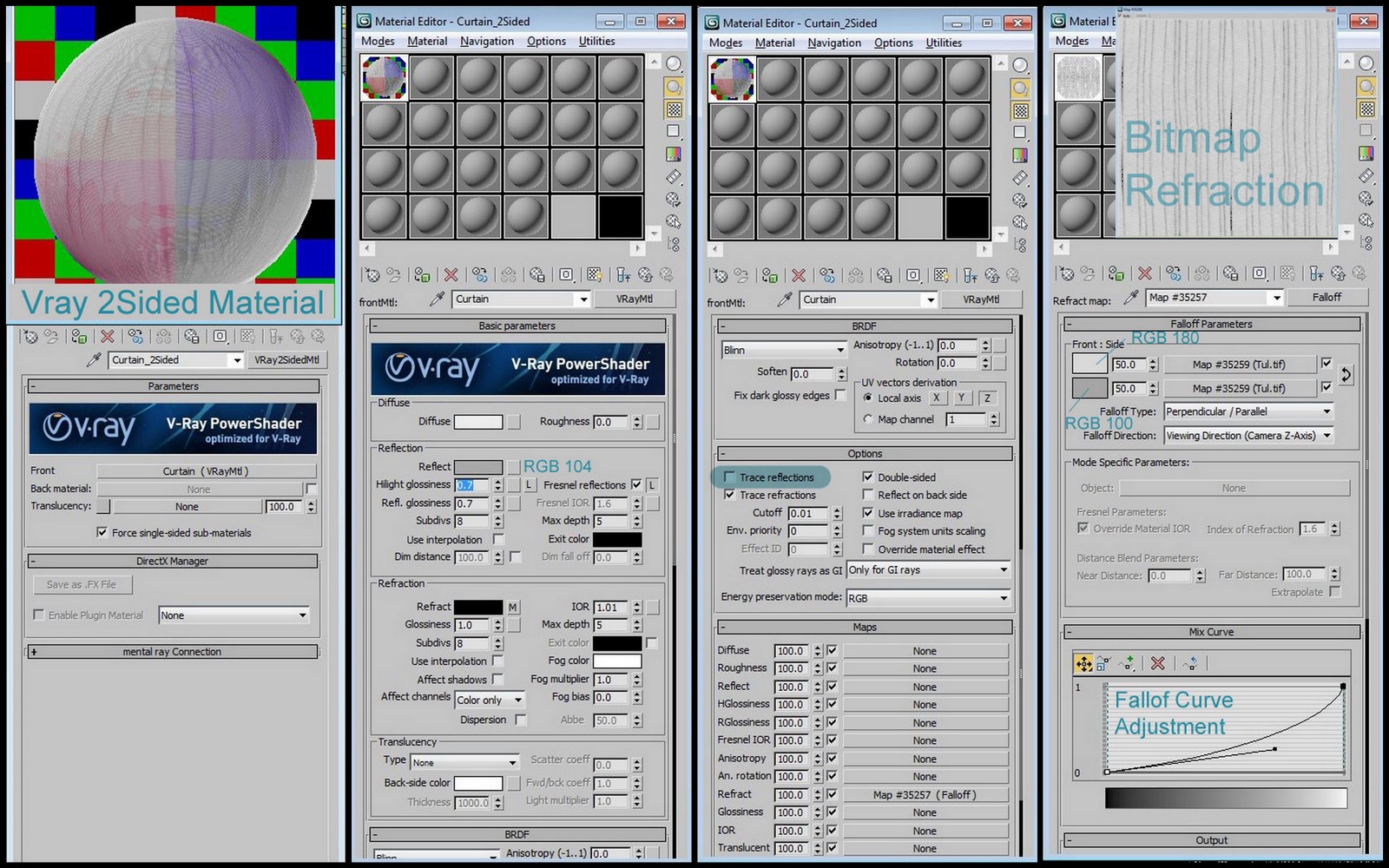
- It is a V-Ray 2-Sided Material to create the translucent look and imitate how light scatters through.
- There is the Fresnel effect on reflections which are blurred (glossy)
- I don’t need to trace exact ray trace reflections (to save from render times.) So I unchecked the “trace reflections”
- There is a falloff map for refraction which makes the curtain less transparent on sides. There is also a map (the same map for both side and front colors) which creates the stripes on my curtain. You can see the adjustment of the falloff curve.
This is all.
I hope I was able to make a clear tutorial. I want to thank so much to everyone who commented on my works showing me my mistakes and showing me how to make it better and for all the inspiration you bring.
And thanks to Ronen for this great site.
Cheers 😉




Congrats Alfa, awesome tips! Thanks!
Thank you Alfa for sharing. I will use these tips for sure 😉 Best wishes!
Very Helpful indeed!! Thanks!!
Great tutorial Alfa! It’s so easy to skip over the observation phase of material creation, thanks for reminding me to really look and think about what I’m making before I make it!
@samuelconlogue Yes I think that is the main stage 🙂
thanks, very kind of you
thanks for this mini tutorial! simple, but very useful.
Great tips! Thanks for sharing pixela25
@mattguetta @ronenbekerman Ohhh I just see that it is online JUST NOW! 🙂
🙂 I am happy if it is helpful.
@arkinesref Thank you 🙂 I wishtoo! Yes hopefully next year!!!
excellent! just want I needed for my new curtains 🙂
Excellent Alfa,
I will be very useful for future work. Thanks for sharing your knowledge.
Greetings.
@pixela25 Thank so much for this tutorial Alfa!
@thangnguyencg welcome:) glad if was useful!
@arkinesref 🙂 I love Italian food sooooo much!
wow.thank you so much!!!
Thank you, thank you, thank you! 🙂
That’s really helpful thanks for the tip!
Thanks for this, but don’t you think that adding the falloff map to the opacity Chanel is much better than adding it to the refraction one, and hence will reduce render time?
Hi, Nice thanks alot! Say, how could i get my shadows to be transparant too? My ‘affect shadows’ is ticked under Refraction but cant seem to get my shadows to act realistic. I’d love them to overlap as u will but they just fill up the whole shadow Thanku!
It was really helpful and made me to read many times. I really appreciate for sharing your knowledge with amateurs like me that make my progress through Pro’s experience like you. Wish you the best
Where can we find the bitmap refraction texture?